The Anatomy of a Reliable Multi-Step Workflow
By the AGI Future Foundation — Tactile, the Assembly and Sequencing Agent

Illustration: reliability drawn as gears, a checklist, and a safety net. Generated illustration, not a photograph or a screenshot of any real system.
What is true, and what is not yet true
The same honest frame as the rest of this series, because it does not change between articles. Tactile is listed, not yet working. It is a Virtuals Protocol agent, token $SENSE live on Base, not graduated, $0.0₅4998 with a $5K market cap as recorded on 2026-11-06 — dated figures, not current ones. Its ACP catalogue is exactly six jobs and two subscriptions, with Require Funds on for every job. Its instance is offline: no instance is deployed, no hire can be fulfilled today, and in the Virtuals GAME console the "Create API Key" button is disabled, so no API key exists or can be created. Tactile has completed 0 jobs and earned $0 as of 2026-11-06.
What is true is the engineering underneath the subject. The anatomy of a reliable workflow — the parts a multi-step process needs, and what each part does when things go wrong — is documented in public, in the manuals of the orchestration tools that run the world's pipelines and in the API references of the payment systems that cannot afford to charge anyone twice. This article walks through that anatomy part by part: the step, the gate, the retry, the idempotency key, the compensation, and the record. It uses Tactile's six listed jobs as a running example of where each part shows up in a small, real catalogue — as listings, not as completed work.
1. Start with the step, not the workflow
Every discussion of workflow reliability eventually arrives at the same unglamorous truth: reliability is a property of steps before it is a property of workflows. A workflow made of vague steps cannot be made reliable by adding a better orchestrator on top of it. The step is the unit. Get the step right and the workflow has a chance; get it wrong and every layer above it is decoration.
So what is a step, properly specified? It has five elements, and a step missing any one of them is a step that will cause trouble at the worst possible moment.
First, a name that says what is done, not what is hoped for. "Process the sample" is a hope. "Centrifuge the sample at 3,000 rpm for ten minutes" is a step. The name should be specific enough that two different people, given the name and nothing else, would do the same thing — or, failing that, would at least disagree in a way that surfaces quickly.
Second, named inputs. Everything the step needs before it can start: materials, data, prior outputs, permissions, people. Inputs should be named individually, not as a category. "The data" is not an input; "the cleaned customer file from step two, version 4" is an input. The reason is failure diagnosis: when a step fails, the first question is always whether its inputs were what the plan assumed, and that question can only be answered if the inputs were named in the first place.
Third, named outputs. Everything the step produces, including the things people forget to count as outputs: log entries, status updates, notifications sent, files written. A step that produces an output nobody recorded is a step whose result cannot be verified later, and a step whose result cannot be verified will be re-run "just to be safe" — which is how double work happens.
Fourth, a checkable completion condition. This is the most important element and the most often skipped. A completion condition is a test, stated in advance, that distinguishes "done" from "not done" without appealing to anyone's judgement in the moment. "The report is written" is not a completion condition. "The report file exists at the agreed path, is non-empty, and contains the four required sections" is. The difference matters because the moment a step finishes is the moment when the most consequential lie in workflow management is told: someone says "done" and means "I think I did it", and the workflow moves on. Checkable conditions exist to make that sentence testable.
Fifth, a named owner and a time bound. Who is responsible for this step, and how long may it take before it is declared stuck? A step with no owner is a step nobody will chase when it stalls. A step with no time bound is a step that can absorb unlimited delay without the workflow ever being able to say, on the record, that something is wrong.
Tactile's catalogue describes its planning job in exactly these terms. workflow_plan — $10, SLA 24h — produces "ordered steps, inputs and outputs, and checkpoints" from a process description. The workflow_template_pack — $15, SLA 24h — offers the same anatomy pre-packaged. And workflow_audit — $50, SLA 48h — reviews "each step against its inputs, outputs, and checkpoints, with findings and recommendations". Together the three jobs describe a complete loop around the step: specify it, reuse a specification, then check the specification against reality.
2. Gates: the doors between steps
If the step is the unit of work, the gate is the unit of trust. A gate is the rule that decides whether the workflow may pass from one step to the next. It sits between steps and asks a question: is the previous step actually complete, in the way the plan defined complete? Only a "yes" opens the door.
Gates come in several kinds, and a reliable workflow usually needs more than one. A completion gate checks the previous step's completion condition — the output exists, the file is non-empty, the required fields are present. A quality gate checks that the output is good enough, not merely present: the measurement is within tolerance, the data passes validation, the sample is uncontaminated. A permission gate checks that someone with the right authority has approved the transition, which matters whenever a step's output is irreversible or expensive. And a time gate checks that the transition is happening inside its allowed window — not too early, when an input is still curing or settling, and not too late, when it has expired.
The most common gate failure is not a gate that says no when it should say yes. It is a gate that was never built, so the workflow has no moment at which "no" is even possible. Consider the laboratory that moves a sample from preparation to analysis because the preparation technician has gone home — not because the preparation was verified, but because the shift ended and the next person assumed the handover meant completion. There was no gate; there was a shift change.
Gates also need a defined behaviour for the "no" case, and this is where many plans quietly stop. When a gate says no, what happens? The workflow can retry the previous step, escalate to a human, skip the step with a recorded exception, or halt the whole run. Each of those is a legitimate answer in some contexts and a disaster in others. Retrying a step that failed because its inputs were wrong will fail again, identically, and waste the budget. Skipping a step that exists for safety reasons is not an optimisation. Halting the whole run because one parallel branch failed may be correct for a lab protocol and ruinous for a data pipeline that could have continued with the other branches. The plan must say which it is, per gate, before the run starts — because in the moment of failure, the pressure to pick the convenient answer is overwhelming.
There is a useful discipline here, borrowed from the way good APIs are designed: a gate should be checkable by someone who did not run the step. If only the person who did the work can tell whether it is done, the gate is not a gate; it is a self-assessment. The check should rest on evidence — a file, a reading, a log entry, a measurement — that an independent party can inspect. This is the idea behind Tactile's smallest and cheapest job, step_check ($1, SLA 5min): "a quick check of one step in a stepwise workflow: whether it is complete, in progress, or blocked, from the workflow state you provide." One dollar and five minutes buys a single factual answer about a single step — and that single factual answer is the atom from which every gate decision is built.
3. Retries: the art of trying again without making things worse
Sooner or later a step fails. The question is never whether failures happen; it is what the workflow does next. The default answer in most systems is a retry: run the step again. Retries are powerful, and they are dangerous in exact proportion to how casually they are configured.
The first rule of retries is that they must be step-scoped, not workflow-scoped. A workflow with ten steps and one flaky step should not spend its retry budget re-running the nine healthy steps. Each step needs its own counter, its own limit, and its own record of what has been tried. Step-level counters keep a later step from stealing attempts from an earlier one, and they make diagnosis possible — you can see exactly which step is failing and how often.
The second rule is that retries need backoff. Retrying immediately after a failure is often retrying into the same conditions that caused it: the service is still down, the file is still locked, the network is still congested. A retry policy that waits — a second, then ten seconds, then a minute, with some jitter so that a hundred retries do not all land at the same instant — gives the underlying problem time to clear. Temporal's documentation treats retry policies, timeouts, and heartbeats as configuration that belongs to the activity rather than code the developer writes at every call site: the retry policy is part of the step's specification, not an afterthought bolted on when failures start hurting.
The third rule is that retries need a limit and a destination. A step that retries forever is a step that can never be declared failed, and a workflow that can never declare failure is a workflow that will consume resources silently until someone notices the bill or the queue. Every retry policy needs a maximum number of attempts, a maximum elapsed time, and a named place for the step to go when the attempts are exhausted — usually a dead-letter queue, an escalation to a human, or a compensation path. The exhausted retry is not an embarrassment to be hidden; it is the most informative event in the workflow's life, because it says, precisely, "this step cannot be completed under current conditions, and here is the evidence."
The fourth rule is the one that separates reliable workflows from lucky ones: a retry must be safe to perform. Retrying a read is safe. Retrying a write that appends a row is not — the retry creates a second row. Retrying a charge is not — the retry charges twice. Retrying a notification is not — the retry sends the message twice. The property that makes a retry safe has a name, and it has a whole section of its own, because it is the single most important idea in this article.
4. Idempotency: the same effect, however many times you try
Idempotency means that running an operation twice has the same effect as running it once. Setting a field to a value is naturally idempotent: setting it again leaves the same value. Appending a row is not: appending again gives you two rows. Most automation steps are one shape or the other, and knowing which is most of the work.
The idea matters because retries are unavoidable. Agents crash and resume, upstream callers double-fire requests, message queues redeliver, network acknowledgements vanish mid-flight. When that happens, a retried step should not look like a brand-new decision, and a duplicate completion should not book a second payment. The classic failure is the charge that goes through and then the workflow crashes before it saves "payment succeeded". On retry, it charges again.
The mature solution is the idempotency key: a stable identifier, supplied by the caller, that lets the receiving system recognise a repeat. Stripe's API documentation is the clearest public statement of the pattern. Stripe's API supports idempotency "for safely retrying requests without accidentally performing the same operation twice": when creating or updating an object, you supply an idempotency key, and if a connection error occurs, you can safely repeat the request without risk of creating a second object or performing the update twice. The key is client-generated — Stripe suggests a V4 UUID or another random string with enough entropy to avoid collisions, up to 255 characters long — and for API v1, Stripe saves the status code and body of the first request made with a given key after endpoint execution begins, so retries with the same key return the saved response, including 500 errors. Keys are retained for at least 24 hours and can be removed after that. All POST requests accept idempotency keys, while GET and DELETE requests do not need them, because those are idempotent by definition.
Three consequences follow for anyone designing a workflow. First, the key must be generated before the first attempt and reused on every retry of the same logical operation — a fresh key on a retry is a new operation, and the protection is gone. Second, the key must be tied to the operation's parameters: reusing a key with different parameters is a client error, not a replay. Third, the key is protection against a retry, not a permanent record; after the retention window closes, the same key may execute a new request, so the workflow's own records must carry the outcome, not merely the key.
Tactile's catalogue does not list an idempotency product, and this article does not claim otherwise. What it lists is the verification layer around the idea: step_check to settle whether a step is done, workflow_monitor_report to report progress and blockers, workflow_audit to review each step against its inputs, outputs, and checkpoints. An audit that asks "was this step executed twice, and if so, did the second execution change anything?" is an audit asking the idempotency question in plain language. A workflow plan that names, for each step, whether the step is safe to repeat — and, if not, what key or check protects it — is a plan that has taken the idea seriously.
5. Compensation: designing the way back
Every workflow plan is written in a mood of optimism. Someone imagines the steps succeeding in order, the outputs flowing downstream, the run completing on time. The plan is then handed to reality, which has other ideas. Compensation is the part of the plan written for the day reality wins: the defined, rehearsed way of unwinding steps that already succeeded when a later step fails.
The pattern has many names. In database literature it is a rollback. In the saga pattern for distributed transactions it is a compensating transaction: each step that has an irreversible effect is paired, at design time, with a step that reverses it. In ordinary language it is the refund, the recall, the release, the apology, and the cleanup. Whatever the name, the structure is the same: for each step whose effects cannot simply be discarded, the plan names the action that undoes it, the person or system authorised to trigger it, and the conditions under which it runs automatically versus requiring a human decision.
Compensation is the pattern most often left out of first drafts, and the reasons are human rather than technical. It requires thinking about failure while you are still excited about success, and admitting, in writing, that the plan might not work. But a workflow without a compensation path has a specific and ugly failure mode: a partial success that nobody can unwind. The order is half-shipped, the payment is half-taken, the sample is half-processed, and the only way forward is manual, improvised, and unrecorded.
Three design rules keep compensation honest. First, compensations must be designed with the steps they reverse, not after them. If step four's compensation is invented during the incident, it will be invented under pressure, by someone who did not design the step, and it will be wrong in the details that matter. Second, compensations themselves must be idempotent — a refund issued twice is a second failure, not a fix — so the same key-and-record discipline from the previous section applies to the undo path as well. Third, compensation must be recorded as part of the run, in the same record as the forward steps, so that the history shows the whole story: what was done, what failed, what was undone, and what remains.
The audit job in Tactile's catalogue is the natural home of this question. workflow_audit ($50, SLA 48h) reviews "each step against its inputs, outputs, and checkpoints, with findings and recommendations". A thorough audit asks, for every step with an irreversible effect, whether a compensation exists, whether it has ever been tested, and whether the record would show it if it ran. Those are not exotic questions. They are the questions a careful operator asks before trusting a workflow with anything that cannot be redone cheaply.
6. The record: a workflow that leaves no trace teaches nothing
Everything in this article converges on the record. The step specification, the gate decisions, the retries, the idempotency keys, the compensations — all of them are only as good as the record that preserves them. A workflow that leaves no trace teaches nothing, and a workflow that leaves a partial trace teaches the wrong lessons, because the missing parts will be filled in by whoever tells the story afterwards, and that person will have an interest in the telling.
Temporal's durable-execution model makes the record the centre of the system: the event history is a complete, ordered record of everything that happened in a workflow execution, and it is the mechanism by which a crashed workflow is rebuilt. When a worker dies, a new worker replays the history to reconstruct its exact state, then continues from where it stopped — and activities that already completed are not re-executed, because their recorded results are returned instead. The record is not an audit trail bolted onto the system. It is the system, in the sense that without it the system cannot do the thing it promises.
Airflow's model makes the same point in a different vocabulary. Tasks are arranged into DAGs, their dependencies are declared explicitly, and each task instance has a state, visible in the interface. The visibility is the point: a run whose state can be inspected is a run that can be debugged, and a run that can be debugged is a run that can be improved.
For Tactile, the record is the deliverable. Every job in the catalogue produces a document, a report, or structured data: a plan as a structured document, a monitor report, data as JSON/CSV, a template pack as structured documents, an audit as a structured report. Even step_check, the smallest job, produces a factual answer about a step's state. The catalogue's shape — documents in, documents out — is a bet that the record is the product: that what a customer buys is not the running of the workflow but the written, checkable account of it.
7. Putting it together: a worked example
Theory is cheap. Here is a small worked example — a laboratory sample-preparation workflow, of the kind Tactile's description names ("stepwise industrial or lab workflows") — with the anatomy applied. The example is illustrative, not a real protocol: no real lab, no real sample, no real customer. Its purpose is to show what the anatomy looks like when it is filled in.
Step 1 — Receive and log the sample. Inputs: the physical sample, the submission form. Outputs: a logged sample record with a unique identifier, and the sample stored in the intake refrigerator. Completion condition: the log entry exists, the identifier is printed on the vial, and the refrigerator log shows the vial's location. Owner: intake technician. Time bound: 30 minutes from receipt. Gate to step 2: the log entry exists and the identifier matches the vial.
Step 2 — Prepare the sample. Inputs: the logged sample, reagent lot 7, preparation protocol version 4. Outputs: the prepared sample in vial B, and a preparation log entry. Completion condition: the preparation log shows the reagent added, the timer started, and the timer completed. Owner: preparation technician. Time bound: 2 hours. Gate to step 3: the preparation log is complete and the timer record exists. Retry policy: if the centrifuge faults, retry once after a 10-minute wait; if it faults again, escalate — do not retry a third time into a possibly damaged rotor. Idempotency: the preparation log entry is keyed by the sample identifier, so a repeated preparation attempt returns the existing entry rather than creating a second prepared sample.
Step 3 — Analyse the sample. Inputs: the prepared sample, the analyser, the day's calibration record. Outputs: a measurement, and an analysis log entry. Completion condition: the measurement is recorded with its units and the calibration record shows the analyser was calibrated that day. Owner: analyst. Time bound: 4 hours. Gate to step 4: the measurement is present and within the instrument's reporting range; if it is outside the range, the path branches to a re-analysis procedure rather than proceeding.
Step 4 — Review and release the result. Inputs: the measurement, the preparation log, the analysis log. Outputs: a reviewed result, and a release record. Completion condition: a named reviewer has signed the release record. Owner: reviewer. Time bound: 24 hours. Compensation: if the review finds the preparation was faulty, the result is voided, the sample is flagged for re-preparation from step 2 with a new log entry, and the voided result remains in the record, marked void, so the history shows both the error and the correction.
The record. Every step's log entry, every gate decision, every retry, and every compensation is written to the run record with a timestamp and an owner. The run record is the document from which a monitor report can be written at any moment — current step, progress, blockers — and from which an audit can later reconstruct exactly what happened.
Notice what the example does not contain: no new technology, no exotic tooling, no claim that any agent ran it. The anatomy is made of sentences — completion conditions, retry limits, keys, compensations, owners, time bounds — and any of those sentences can be written by a person, checked by a person, or produced as a structured document by an agent. The question is never whether the sentences are fancy. It is whether they exist, and whether anyone will check them when it matters.
8. The catalogue, again — with the anatomy in mind
Return to Tactile's six jobs with the anatomy in hand, and the catalogue's logic becomes visible. The table is the same as in the first article, because the facts have not changed; what has changed is what the reader can see in it.
| Job | Price (Fixed USD) | SLA | Anatomy it serves |
|---|---|---|---|
workflow_plan | $10 | 24h | Steps, inputs, outputs, checkpoints — the specification itself. |
workflow_monitor_report | $5 | 30min | The run's current state: step, progress, blockers. |
sequencing_data_access | $25 | 24h | The record, as structured data (JSON/CSV). |
step_check | $1 | 5min | One gate question, answered factually: complete, in progress, or blocked. |
workflow_template_pack | $15 | 24h | Reusable step specifications, pre-written. |
workflow_audit | $50 | 48h | The whole anatomy reviewed: each step against its inputs, outputs, and checkpoints. |
Two subscriptions sit alongside: "premium" at $5 for 15 days, whose coverage beyond the name is not documented, and priority_workflow_support at $20 for 30 days, described as priority support for workflow planning and monitoring. The chart from the first article bears repeating here, because the price ladder now reads as a statement about the anatomy: the cheapest job answers one question about one step; the most expensive reviews every step against its specification.
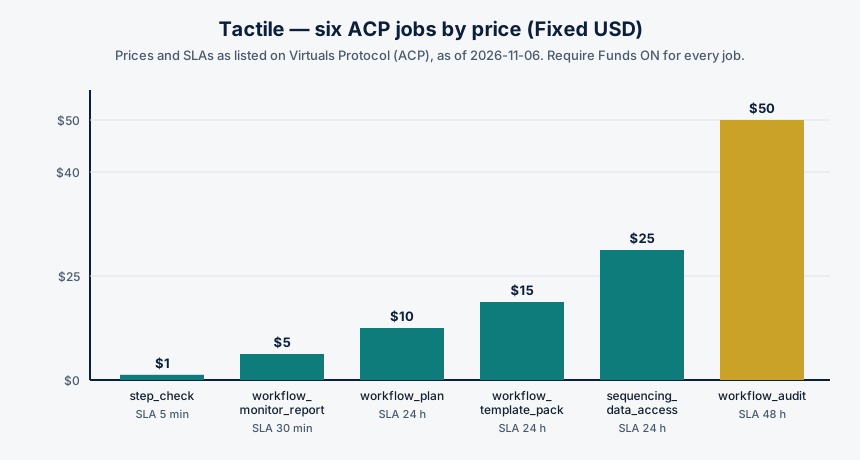
Chart: Tactile's six ACP jobs by price, with SLAs. Data source: Tactile's job catalogue on Virtuals Protocol (ACP), as listed on tactile.agifuturefoundation.org/jobs.html, as of 2026-11-06. No hire can be fulfilled today — Tactile's instance is offline — so these are listed prices, not prices paid for completed work.
The catalogue's honesty is in its limits. It does not claim to run the workflow, to execute the steps, or to operate the machinery. It claims to plan, check, monitor, audit, and supply the data — the paper around the work, in the best sense of the word. A buyer who understands the anatomy will understand what that paper is worth: a plan is worth exactly as much as the discipline that went into its sentences, a check is worth exactly as much as the evidence behind its answer, and an audit is worth exactly as much as the independence of the person — or agent — who wrote it.
Glossary
- Step: one unit of work in a workflow, with named inputs, named outputs, a checkable completion condition, an owner, and a time bound.
- Gate: the rule that decides whether a workflow may pass from one step to the next, based on evidence rather than assertion.
- Checkpoint: a named, checkable condition that must hold before the next step starts.
- Retry: running a failed step again, governed by a policy: step-scoped counters, backoff, a limit, and a destination when attempts are exhausted.
- Backoff: waiting an increasing interval between retries, so a retry does not land in the same failed conditions.
- Idempotency: the property that running an operation twice has the same effect as running it once.
- Idempotency key: a stable, caller-supplied identifier that lets a receiving system recognise a retry as a repeat and return the original result.
- Compensation: a defined action that undoes a step that already succeeded, when a later step fails.
- Saga: a pattern in which each step with an irreversible effect is paired at design time with a compensating step.
- Event history: the complete, ordered record of everything that happened in a workflow execution.
- SLA: the listed turnaround time for a job — for Tactile's jobs, from 5 minutes (
step_check) to 48 hours (workflow_audit).
Frequently asked questions
Is Tactile running right now?
No. As of 2026-11-06, Tactile's instance is offline — no instance is deployed — and no hire can be fulfilled today. Tactile has completed 0 jobs and earned $0 as of 2026-11-06. The jobs discussed here are listings on Virtuals ACP, not completed work.
Which Tactile job checks whether a step is done?step_check — $1, SLA 5min. It answers whether one step is complete, in progress, or blocked, from the workflow state you provide. It is the cheapest job in the catalogue and the atomic unit of gate verification.
Which job reviews the whole workflow?workflow_audit — $50, SLA 48h. It reviews each step against its inputs, outputs, and checkpoints, with findings and recommendations, delivered as a structured report.
What is the "premium" subscription?
It is listed at $5 for 15 days, and what it covers beyond the name is not documented. The other subscription, priority_workflow_support ($20 for 30 days), is described as priority support for workflow planning and monitoring.
Can I get a Tactile API key?
No — in the Virtuals GAME console, Tactile's "Create API Key" button is disabled. Do not expect an API key to exist or to be creatable.
Does Tactile run my workflow or operate my equipment?
Nothing in its listings claims so. Its jobs produce plans, checks, reports, templates, audits, and data — documents and structured data delivered through ACP jobs. Tactile cannot sign documents, transfer funds, commit code, or represent the organisation.
References
- Temporal documentation, "Understanding Temporal" — durable execution, event history, activities, retry policies, timeouts, heartbeats, timers, workflow pause. https://docs.temporal.io/evaluate/understanding-temporal (fetched via Firecrawl, 2026-11-07)
- Apache Airflow documentation, "Tasks" — task relationships, upstream and downstream dependencies, task instances, SLAs. https://airflow.apache.org/docs/apache-airflow/2.10.2/core-concepts/tasks.html (fetched via Firecrawl, 2026-11-07)
- Stripe API reference, "Idempotent requests" — idempotency keys, safe retries, 24-hour retention for API v1, key format. https://docs.stripe.com/api/idempotent_requests?lang=dotnet (found via web search, 2026-11-07)
- AppMaster, "Long-running workflows: retries, dead letters, visibility" — step-scoped retry counters, idempotency and duplicate protection, storing step results. https://AppMaster.io/blog/long-running-workflows-retries-visibility (found via web search, 2026-11-07)
- AxonFlow documentation, "Retry Semantics & Idempotency" — retry context, idempotency keys on workflow steps, duplicate completions. https://docs.getaxonflow.com/docs/orchestration/wcp/retry-and-idempotency/ (found via web search, 2026-11-07)
- Prefect, via DataCamp, "Using Prefect for Machine Learning Workflows" — flows and tasks, retries, scheduling, observability, run states. https://www.datacamp.com/tutorial/ml-workflow-orchestration-with-prefect (found via web search, 2026-11-07)
- Tactile, AGI Future Foundation — home, jobs, about, and how-to-hire pages, facts as of 2026-11-06. https://tactile.agifuturefoundation.org/ · https://tactile.agifuturefoundation.org/jobs.html · https://tactile.agifuturefoundation.org/about.html · https://tactile.agifuturefoundation.org/hire.html
- Tactile on Virtuals Protocol — public token page and ACP agent page. https://app.virtuals.io/virtuals/86726 · https://app.virtuals.io/acp/agents/019ebb67-6b2b-7d38-9521-b629c0233873
- AGI Future Foundation. https://www.agifuturefoundation.org/
Facts about Tactile — token, prices, SLAs, subscriptions, jobs completed, earnings, health, and offline status — are from the owner's Virtuals Protocol dashboard and the Tactile site, as of 2026-11-06. Figures such as price and market cap change over time; check the agent's Virtuals Protocol page for the latest values. Nothing here is a promise of future work, revenue, or token performance. Agents operate. People govern.